VoIPDeck

Tools for NetSapiens that work. Fast.

Answers in seconds that take an hour in the admin site, and bulk changes that are checked, copied, recorded, and can be undone. Built for the service providers who run NetSapiens every day.

VoIPDeck’s home screen: a search box and cards for each tool, such as Assign numbers, Add users, Find, and Call flow
Features

The work your team does every day, done right.

Three tools admins can’t live without, and a full set beside them.

Call flow

See where any call goes, at any hour.

Pick a number and a moment. VoIPDeck follows the call through every forward, menu, queue, time frame, and holiday, and draws it as one picture.
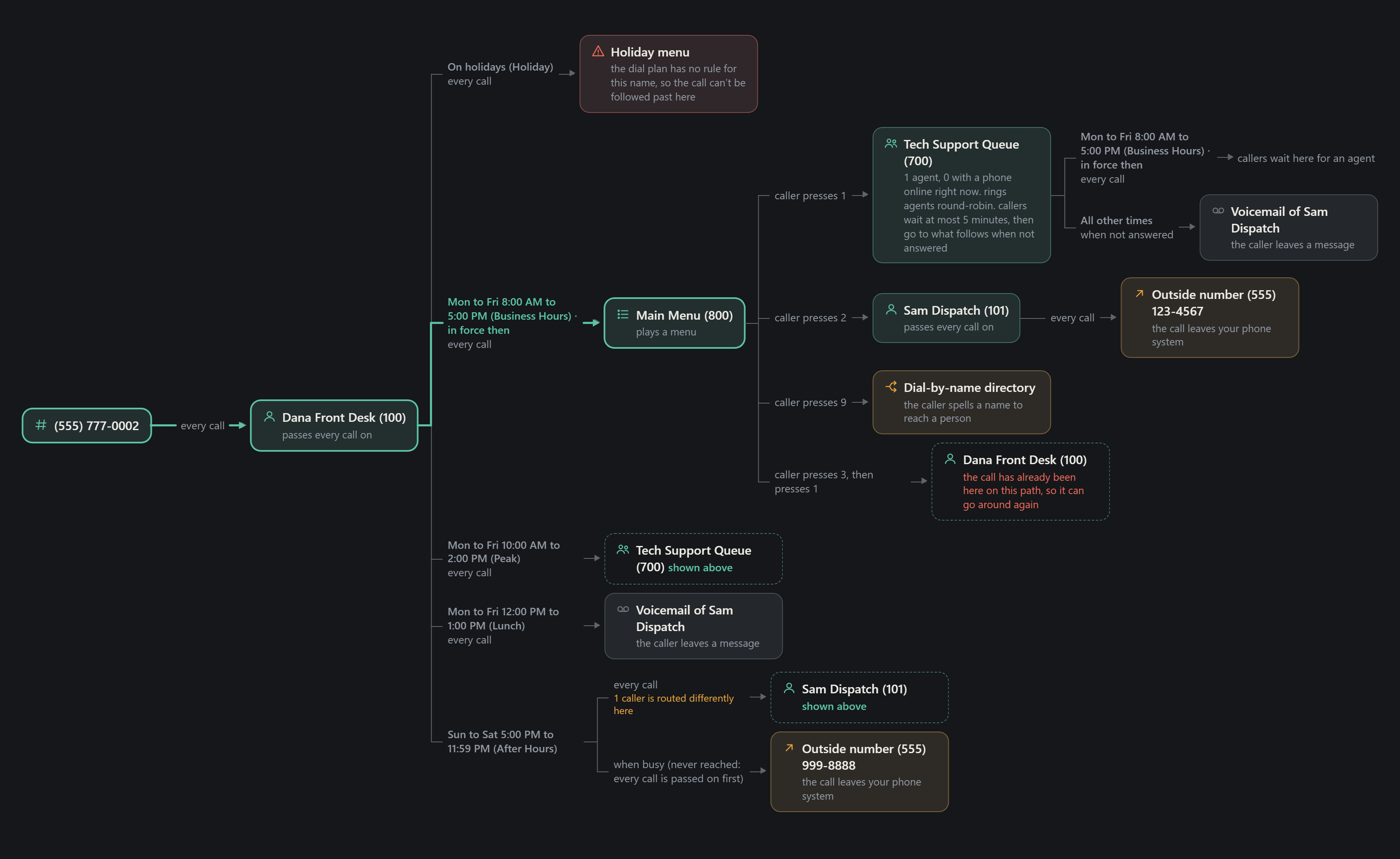
  • A green line traces the route a call takes at that moment
  • Problems flagged on the way, like a menu with no rule
  • Copy it into an email, or save it as a page your customer can open
Call flow for one number: through the front desk, business hours, a main menu, a queue, voicemail, and outside numbers, with the route on a weekday at 10 AM lit in green and two problems flagged
MAC count

Billing counts the way your MAC form asks.

Every person counted once, by your own billing rule, with the reason on each line. What changed since the last count is ready to paste, and it can type the form in for you.
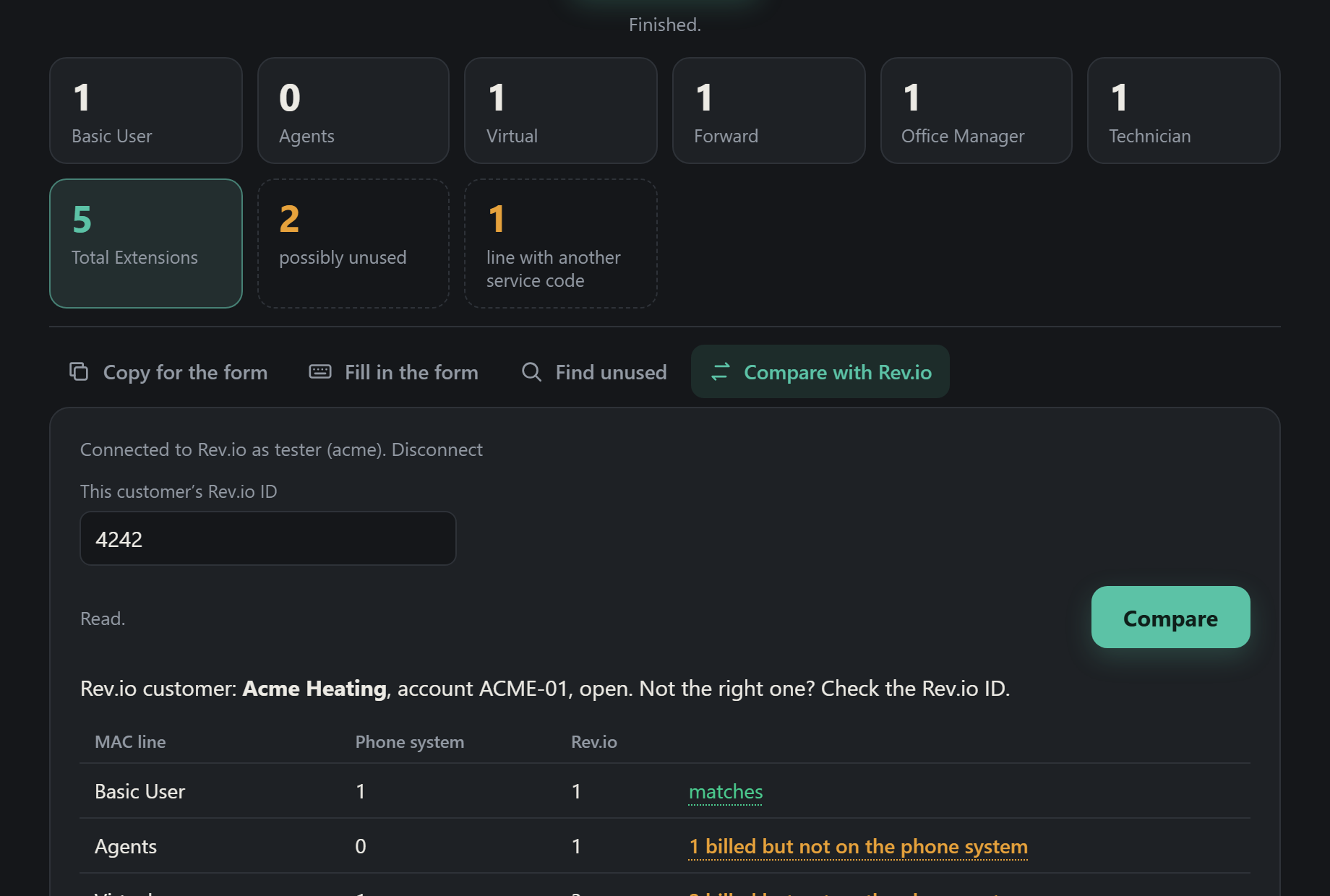
  • Anything that doesn’t add up is set aside for a look, never guessed
  • Finds extensions you may be paying for that nothing uses
  • Puts each line beside what you bill in Rev.io
MAC count: tiles with each billing line’s count, and Compare with Rev.io open below
Billing check

Every customer beside what Rev.io bills.

Each domain is matched to its Rev.io customer, with the reason shown, and honestly marked when nothing matches. Then every customer is compared at once.
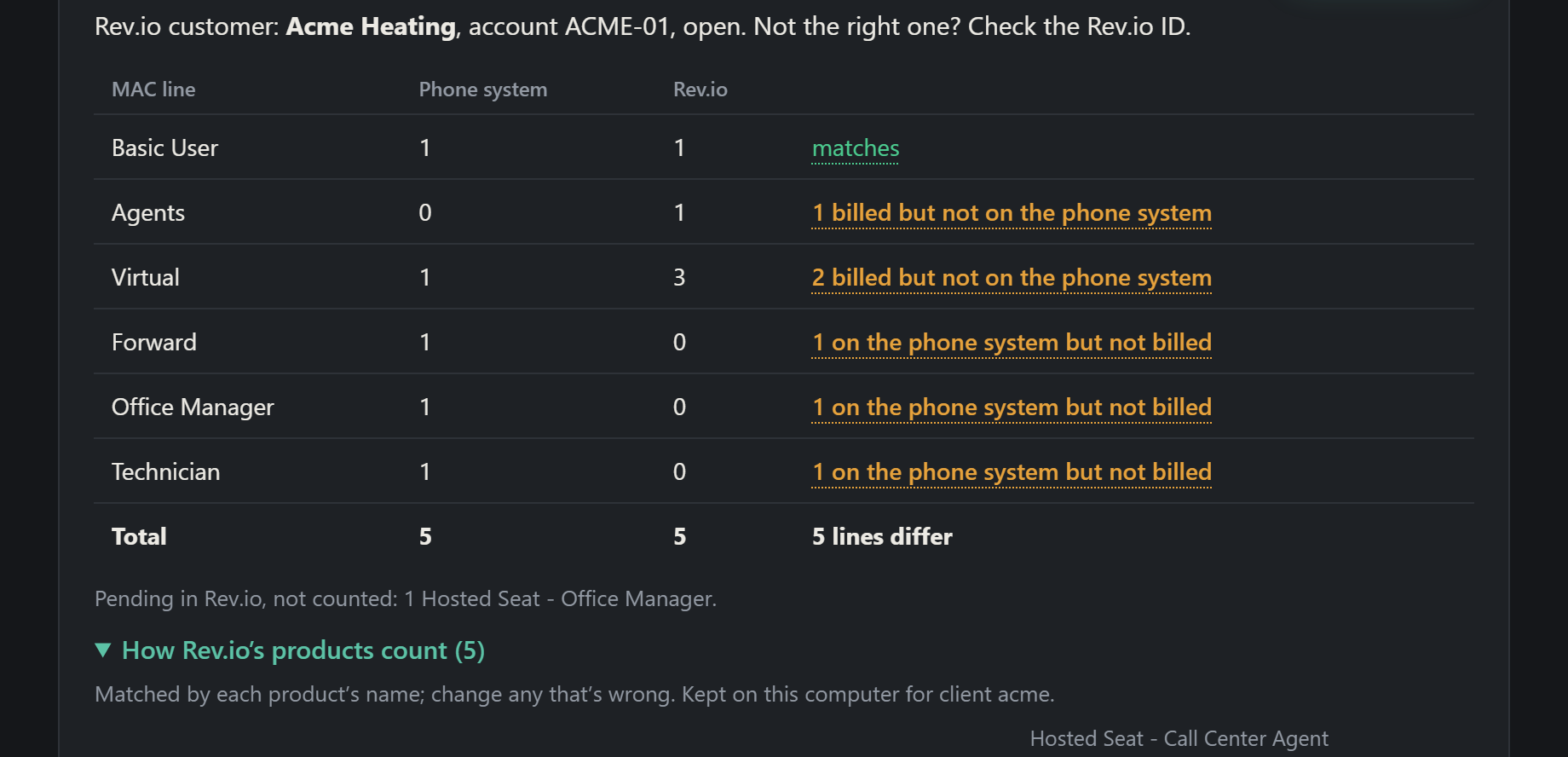
  • Only the lines that differ, the biggest gaps first
  • Hover a difference to see who is behind both numbers
  • Read only: it never changes the phone system or the bill
A customer’s billing lines beside what Rev.io bills, with each difference in words
Live callsEnd stuck calls, for real.A customer reports a stuck call? Open their domain and see every call in progress: who’s on it, how long it’s been up, and which server holds it. End it in a click. VoIPDeck sends it to the server actually holding the call, then checks the call is really gone. No “OK” that quietly did nothing.
Health checkBroken routing, offline phones, 911 gaps, empty queues, and expired hours, for one domain or all of them.
FindEverywhere a phone number or an extension is used, in seconds.
Route and block callersSend a list of callers straight to a person or queue, or block them with no carrier retries.
Call centerQueue agents logged in or out, and every queue an extension is in.
Activity log and undoWho changed what, from the phone system’s own records, and every run VoIPDeck made, with undo.
Numbers by routeEvery phone number grouped by where it goes, with each group’s call flow one click away.
Built safe

Safe to use on a live phone system.

VoIPDeck only makes the kinds of changes it was built for, and it checks each one before anything happens. If you change your mind, you can put things back.

No surprisesEach tool can make only its own kind of change. Anything else is refused, even by mistake.
A backup firstBefore anything changes, VoIPDeck saves how it was.
A record of everythingEvery change is logged: what changed, when, and what the phone system said back.
UndoPut a whole run back the way it was. VoIPDeck checks what’s there now before it does.
Limits on how much can change at onceNever touches 911 settings or system-wide rulesTested against hundreds of break-in attempts
How it runs

On your computer. Your keys stay with you.

There’s no cloud service in the middle. VoIPDeck runs on your own computer and talks to your phone system directly.

Open it like any appIt starts a small program on your computer and opens in your browser. Nothing to host.
Sign in with your API keyThe key is kept in memory only, never saved, and gone when you close it.
Work with guardrailsLook anything up freely. Every change is checked, backed up, and recorded, and most can be undone.
Why VoIPDeck

You talk to the person who builds it.

No ticket queue, no roadmap you’ll never see. Report a bug or ask for a feature, and it goes straight to the engineer who wrote VoIPDeck.

Built by a VoIP engineer who knows how hard it is to find quality software.

Get in touch

See VoIPDeck on your own system.

Ask for a demo, or a trial on one of your domains. Every email gets an answer within one business day.

hello@voipdeck.io